Revo 3 Product Manual
Product Summary
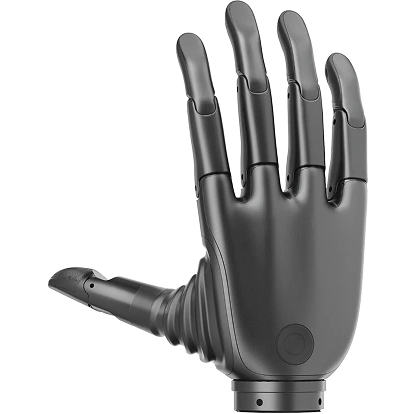
BrainCo Revo 3 is a bionic dexterous hand for industrial automation, research and robotic manipulation. Its 21 independent motors provide 21 fully active degrees of freedom. It supports RS-485, CAN FD and EtherCAT communication, with C/C++ and Python SDKs for Linux and Windows.
Product Features
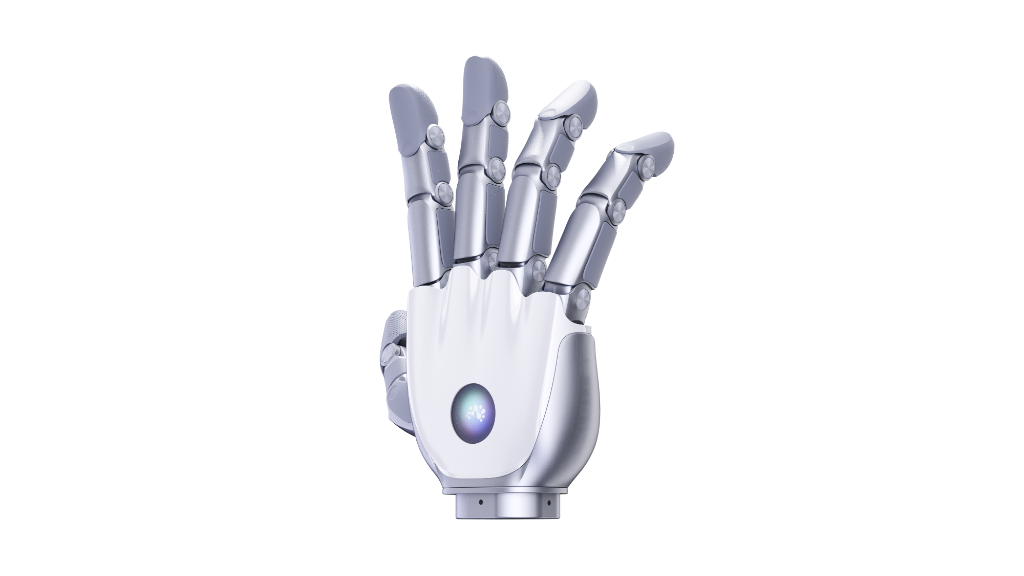
- 21 fully active degrees of freedom: Independent motors enable opposition, abduction/adduction, coordinated finger movement and multiple grasp configurations. Each finger segment is independently controllable and backdrivable.
- High-resolution tactile sensing: Tactile versions use distributed arrays to detect contact and pressure distribution for fragile, flexible and irregular objects.
- Reliability and environmental testing: Core joints are rated for 1,000,000 flex cycles, with drop, vibration, load, temperature and salt-spray validation.
- Development interfaces and software ecosystem: C/C++ and Python SDKs, ROS support and integration examples support robotics development and algorithm verification.
Dimensions and Degrees of Freedom
Product Dimensions
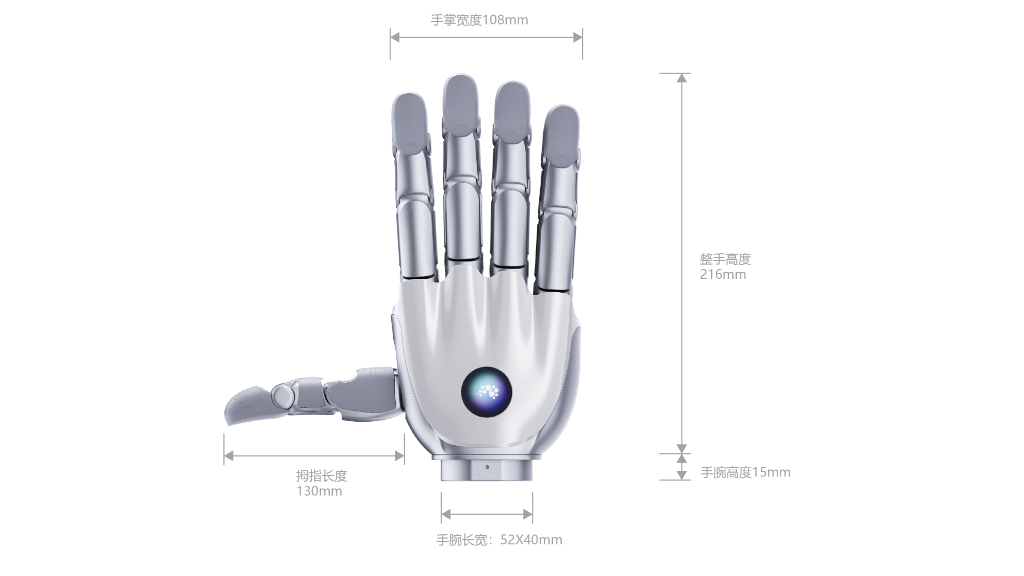
Overall hand dimensions: 216 × 108 × 50 mm.
Degrees of Freedom Distribution
Revo 3 has 21 fully active, independently driven degrees of freedom: five in the thumb and four in each of the index, middle, ring and pinky fingers.
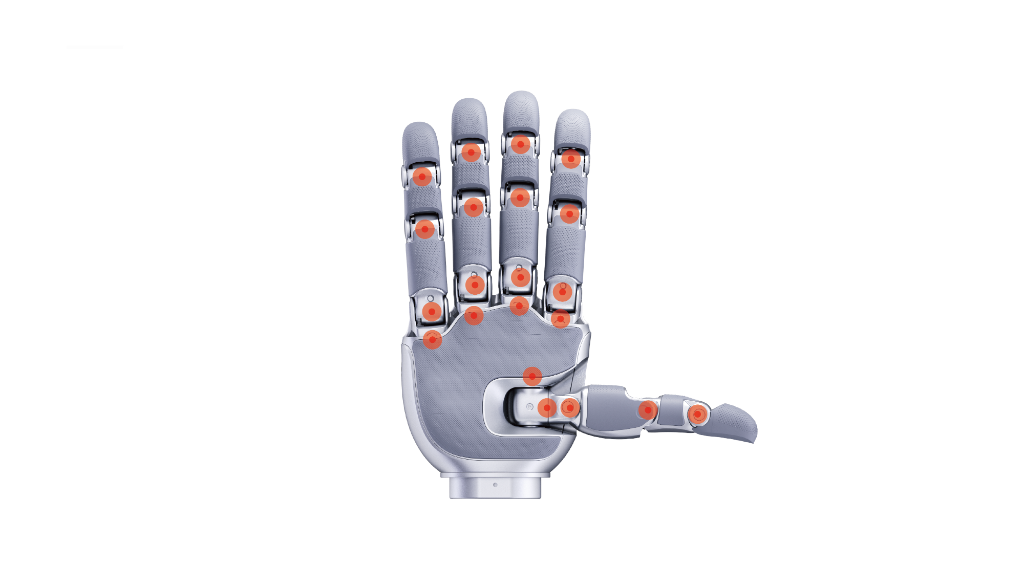
| Finger | Active Joint | Angle Range |
|---|---|---|
| Thumb | CMC Abduction/Adduction, J19 | 0°–110° |
| CMC Rotation (opposition), J20 | 0°–105° | |
| CMC Flexion/Extension, J16 | 0°–75° | |
| MCP Flexion/Extension, J17 | −10°–90° | |
| IP Flexion/Extension, J18 | −20°–90° | |
| Index | Abduction/Adduction | −10°–30° |
| Middle | Abduction/Adduction | −20°–25° |
| Ring | Abduction/Adduction | −25°–20° |
| Pinky | Abduction/Adduction | −30°–10° |
| Index, middle, ring and pinky | MCP Flexion/Extension | −5°–90° |
| PIP Flexion/Extension | −10°–90° | |
| DIP Flexion/Extension | −20°–90° |
Commands and feedback use J indices. Use device-reported operating limits from hand.config.snapshot().
Product Versions
| Model | Version | Main Tactile Configuration |
|---|---|---|
| Revo 3 U21 | Base | No tactile sensing |
| Revo 3 U21F | 3D Force | Fingertip three-axis force |
| Revo 3 U21T | Tactile | Full-palm piezoresistive array |
| Revo 3 U21VT | Vision-based Tactile | Palm piezoresistive array + fingertip visuotactile sensing |
All four models have 21 fully active degrees of freedom. Sensor configurations can vary within a version; confirm functionality and coverage against the product selection information and delivery list.
Core Parameters
| Category | Parameter | Revo 3 U21 | Revo 3 U21F | Revo 3 U21T | Revo 3 U21VT |
|---|---|---|---|---|---|
| Degrees of Freedom | Total DoF | 21 (fully direct-drive, backdrivable) | 21 (fully direct-drive, backdrivable) | 21 (fully direct-drive, backdrivable) | 21 (fully direct-drive, backdrivable) |
| DoF Distribution | Four fingers: 4 × 4 DoFs; thumb: 5 DoFs | Four fingers: 4 × 4 DoFs; thumb: 5 DoFs | Four fingers: 4 × 4 DoFs; thumb: 5 DoFs | Four fingers: 4 × 4 DoFs; thumb: 5 DoFs | |
| Dimensions | Overall Hand Size | 216 × 108 × 50 mm | 216 × 108 × 50 mm | 216 × 108 × 50 mm | 216 × 108 × 50 mm |
| Operating Parameters | Supply Voltage | 16–85 V | 16–85 V | 16–85 V | 16–85 V |
| Maximum Current | 10 A (at 24 V) | 10 A (at 24 V) | 10 A (at 24 V) | 10 A (at 24 V) | |
| Maximum Active Grip Force | ≥100 N | ≥100 N | ≥100 N | ≥100 N | |
| Maximum Fingertip Pinch Force | ≥25 N | ≥25 N | ≥25 N | ≥25 N | |
| Whole-Hand Payload | 20 kg | 20 kg | 20 kg | 20 kg | |
| Four-Finger Payload | 5 kg | 5 kg | 5 kg | 5 kg | |
| Repeatability (Position) | 0.1° | 0.1° | 0.1° | 0.1° | |
| Joint Actuation Time (Open to Close) | 0.33 s | 0.33 s | 0.33 s | 0.33 s | |
| Motion Capabilities | Motion Ability | Kapandji opposition test (full score); covers 33 grasp patterns (Feix GRASP taxonomy) | Kapandji opposition test (full score); covers 33 grasp patterns (Feix GRASP taxonomy) | Kapandji opposition test (full score); covers 33 grasp patterns (Feix GRASP taxonomy) | Kapandji opposition test (full score); covers 33 grasp patterns (Feix GRASP taxonomy) |
| Minimum Grasp Diameter | 10 mm | 10 mm | 10 mm | 10 mm | |
| Maximum Grasp Diameter | 150 mm | 150 mm | 150 mm | 150 mm | |
| Hardware Configuration | Communication Interfaces | EtherCAT / CAN FD / RS-485 | EtherCAT / CAN FD / RS-485 | EtherCAT / CAN FD / RS-485 | EtherCAT / CAN FD / RS-485 |
| Communication Frequency | 500 Hz | 500 Hz | 500 Hz | 500 Hz | |
| On-board Sensors | IMU (mainboard), temperature sensor (mainboard) | IMU (mainboard), temperature sensor (mainboard) | IMU (mainboard), temperature sensor (mainboard) | IMU (mainboard), temperature sensor (mainboard) | |
| Tactile | Tactile Distribution | — | Fingertip tactile sensing | Full-palm tactile sensing | Full-palm tactile sensing |
| Tactile Type | — | Fingertip three-axis force | Full-palm piezoresistive array | Palm piezoresistive array + fingertip visuotactile sensing | |
| Number of Taxels (Sensing Points) | — | 5 modules (3D force) | 451 points (piezoresistive array) | 336 points (piezoresistive array) + 2000 markers (visuotactile sensing) | |
| Force Range | — | 0–20 N | 0–20 N | 0–20 N | |
| Force Resolution | — | 0.01 N | 0.01 N | 0.01 N |
Connection Instructions
Package Contents
Actual contents depend on the purchased model and delivery list. The diagram shows accessory combinations for the standard and tactile versions.
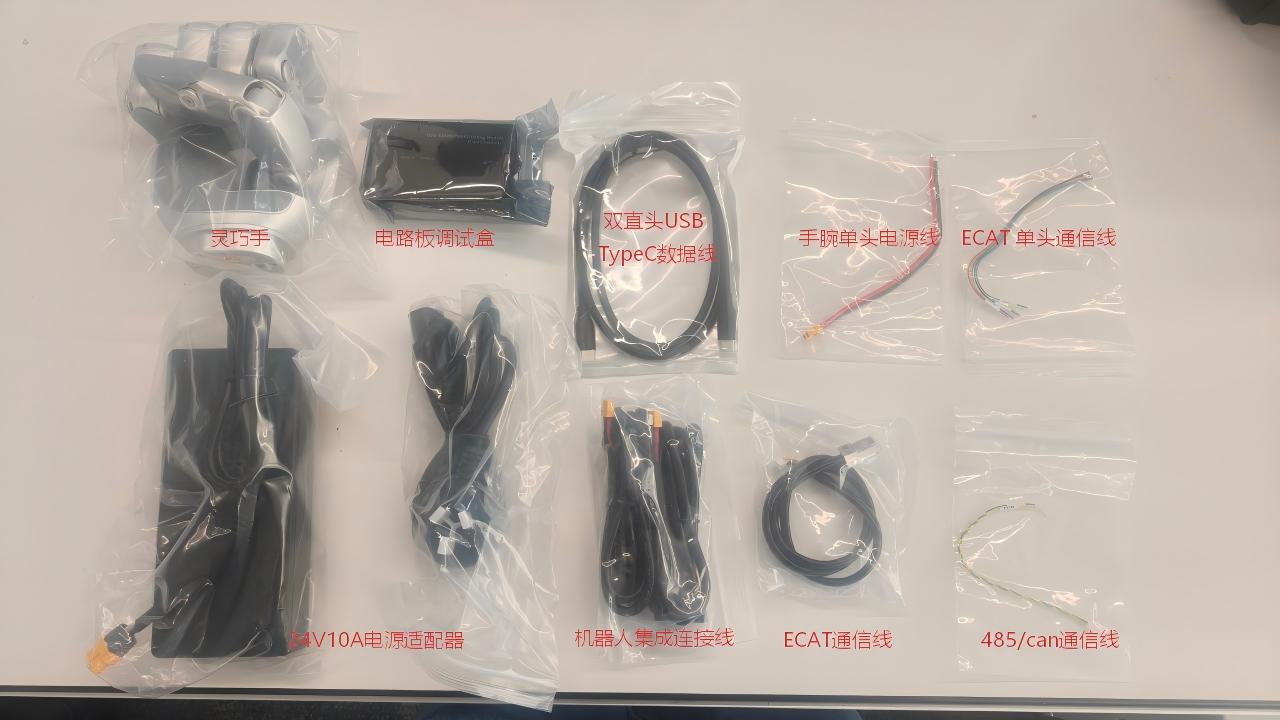
- Revo 3 dexterous hand
- Debugging box
- USB Type-C data cable with two straight connectors
- Wrist power cable
- Single-ended EtherCAT communication cable
- 24 V / 10 A power adapter
- Robot integration cable
- EtherCAT communication cable
- RS-485 / CAN FD communication cable
Usage Instructions
Revo 3 supports data exchange and control through RS-485, CAN FD or EtherCAT.
Communication Interfaces
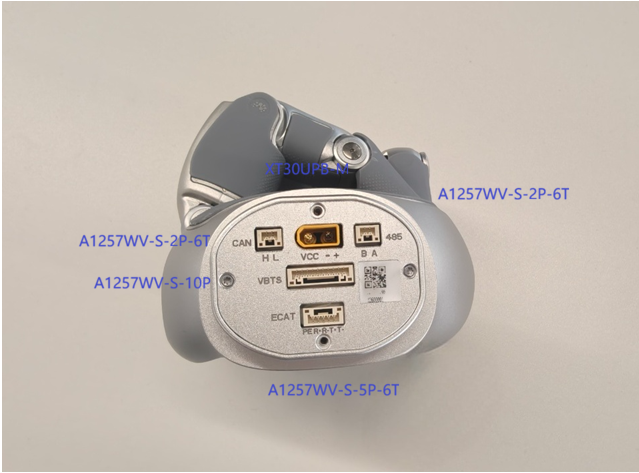
| Interface | Connector | Purpose |
|---|---|---|
| RS-485 | A1257WV-S-2P-6T | RS-485 communication |
| CAN FD | A1257WV-S-2P-6T | CAN FD communication |
| EtherCAT | A1257WV-S-5P-6T | EtherCAT communication |
| VCC | XT30UPB-M | Main power supply |
| VBTS | A1257WV-S-10P | Tactile and sensor data expansion |
Connecting the Device
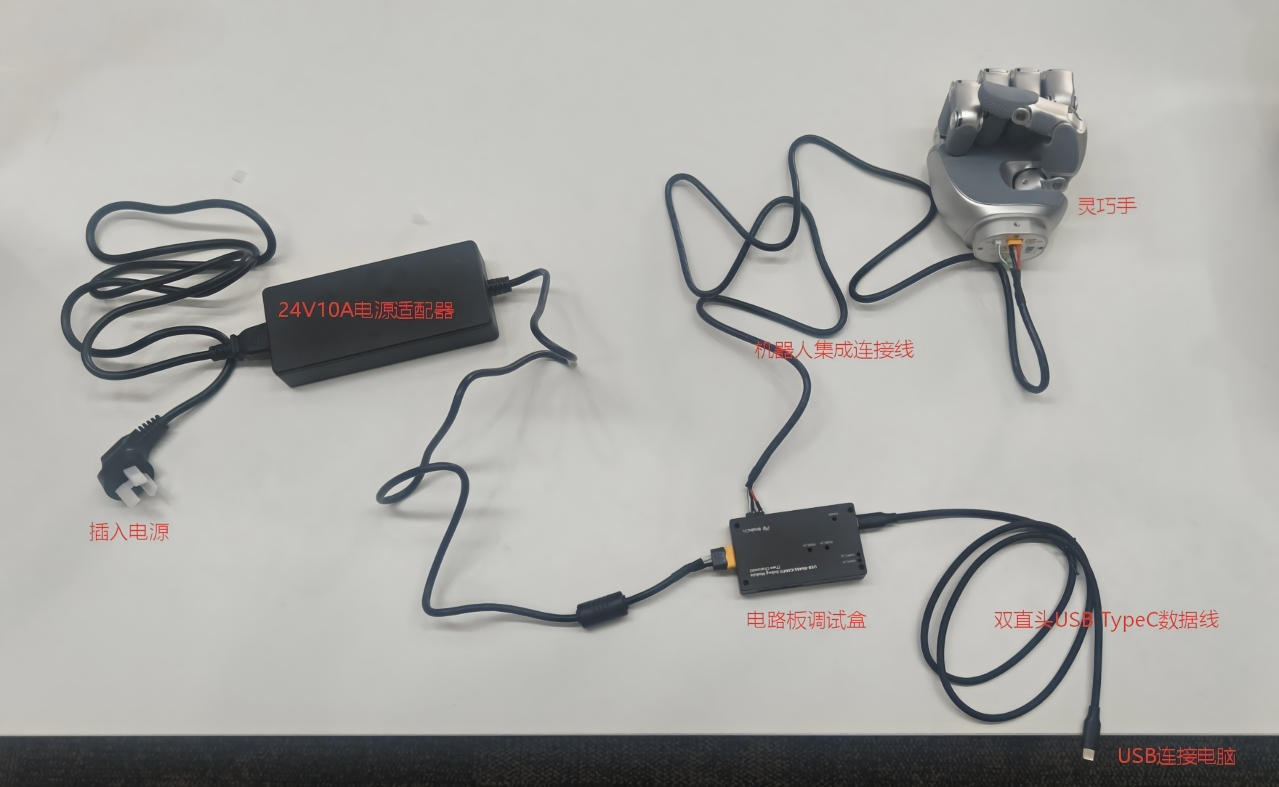
Connect the hand, robot integration cable, debugging box and USB Type-C cable in that order, then connect power. Disconnect power before wiring or changing communication cables.
Power supply and bus guidance
- Use a stable 24 V industrial DC supply rated above 100 W.
- At 5 Mbps, use shielded twisted-pair wiring and keep the RS-485 bus short.
- Check polarity, connector type and pin order before powering on. Do not hot-plug.
Device IDs
Default RS-485 IDs are 126 for the left hand, 127 for the right hand and 0 for broadcast. Assign unique IDs when connecting multiple devices. Broadcast commands affect all devices on the same bus.
Power-On Calibration
During position calibration, fingers search for their starting positions and may open automatically.
Calibration guidance
- Remove held objects before calibration to prevent drops.
- Keep people, cables and obstacles outside the fingers' motion range.
- Automatic calibration depends on configuration and firmware. Confirm calibration status before control.
Usage Notes
Communication
SDK v2.x uses the Manager and Hand interfaces for RS-485 Modbus RTU and CAN FD. EtherCAT uses a separate Linux IgH C++ integration.
Power Requirements
Input voltage is 16–85 V. Use a stable 24 V industrial DC supply rated above 100 W. Heavy loads or simultaneous finger motion increase instantaneous current; insufficient supply capacity may cause voltage drops or controller resets.
Real-Time Control Frequency and Latency
Use hand.motion.open_servo() for continuous control. The application manages sending intervals, command timeouts and session closure. RS-485 defaults to 5 Mbps; actual control frequency and latency depend on host scheduling, adapters, bus load, device configuration and firmware. State subscription frequency differs from Servo command frequency. Measure timing, jitter, timeouts and packet loss on the target system.
Calibration Operations
hand.calibration provides calibration, calibration current, position zeroing, zero-offset access and restoration of default finger parameters. hand.config manages automatic power-on calibration. Confirm the device, motion space and load before calibration, then read back zero offsets, State and Health.
Model and Configuration Confirmation
Read serial number, model, handedness and hardware version from hand.device_info, and layout ID, version and joint count from hand.joint_layout. Use JointLayout to validate target-array lengths and read device limits. Serial numbers identify devices for support; do not infer model or tactile configuration from their characters. Contact technical support if device information is inconclusive.
Contact and Support
For technical, integration, customization or purchasing questions, contact BrainCo or use the documentation's Help entry.